| 0 | 36 Comments
| More

Lynnette

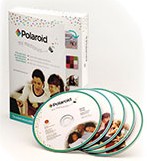
My Memories Suite - A New Digital Scrapbooking Program By Polaroid

my-memories-suite-by-polaroid.jpgA diehard scrapbooker (Creative Memories 12x12 albums) for nearly 20 years, I gave up scrapbooking 2 years ago.

Why? Because it was so time-consuming... and so expensive to keep buying all of the embellishments & papers.

Yep, even after I'd invested hundreds (no, I mean thousands!) of dollars in supplies for my all-time favorite hobby, I gave it all up cold turkey one day.

That's why I was so thrilled to see there's a new computer scrapbooking program called My Memories Suite.

I've had my eye out for a program like this for some time now. But I've never been fond of the "typical" computer scrapbook programs out there. They're just so basic, and boring, and sterile -- compared to "real"scrapbooks where the images and designs and embellishments just pop off the pages.

But finally, I think I've found a computer scrapbook program that I would use.

My Memories Suite by Polaroid is new. (It debuted in October of 2007.) The program was was created by StoryRock Electronic Publishing, "the technology provider of the leading digital scrapbooking program for home use, allowing consumers to easily integrate all their memories into professionally designed pages."

Here's a great 6-minute video describing the many features of My Memories Suite.


Why I Like This Program:

  • For $80 (which seems a tad high, but I'd pay it), you get quite a lot. Definitely more than enough to keep you scrapbooking digitally for a long time without running out of ideas.
  • You can take the easy route, and let the program auto-fill the pictures into the spaces for you. Or, you can pick & choose which photos you want where, how you want them cropped.
  • The end result of the pages that you create can be shared in these formats:
    • on your own computer

    • in a hard-bound (thin) book, soft-bound book, or spiral-bound book -- with 13 pages printed front & back, plus cover

    • on a DVD -- to watch on your TV or give as a gift.

  • Whether you print out your scrapbook pages or not, you can add 3D embellishments to the pages that appear to jump off the pages. Plus, if you're use this program simply for the templates, and you print out the pages to place in your own scrapbook, you can still add "real" embellishments to the pages!

My Memories Suite is capable of printing square-shaped albums as large as 12"x12" and landscape and portrait-shaped albums as large as 8.5"x11". The size of the paper in your printer (and what size the printer itself is capable of handling) will determine the maximum size that you are able to print your album page. Source
  • I really like how "interactive" it is. You can embed videos, and audio files. Think: friends singing Happy Birthday behind a birthday photo or a full-length song from your mp3 collection that plays while viewing your album.
  • No more papers, glues, tapes, messy workspaces, and storage problems. With this program, everything is stored and saved right on your computer. Simple and neat.
  • Their tech support seems decent (...according to others who've used it).

The cool thing about this is that if you decide you want to switch to another program later, you can use all the files for this program with other photo editing software. The files are all in .png & .jpg format. Other simple digiscrap programs like Creative Memories can only be used with their files. This one is a bit more versatile. And you can add your videos and music. --Meredith
View the complete user guide (.pdf)


What I Don't Like:
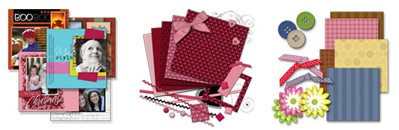
While the program comes with TONS of great templates which are used to create the background for your pages, I don't like the fact that additional templates are $5.99 each. Similarly, additional theme packs are anywhere from $4.99 to $9.99. And additional embellishments are $1.99 to $3.99 apiece.
my-memories-suite-kits.jpg

For the really creative folks who don't want any 2 pages to look alike, I can see this getting expensive in no time. Then again, I think it would take quite awhile for me to grow tired of their pre-loaded templates. And, if you're using this program primarily for making gifts, or recipe books, or other picture books for friends & relatives, then this program should have plenty of options to keep you satisfied.
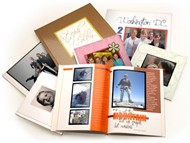
my-memories-suite-photo-books.jpgThe hard-bound picture books are an attractive option to me. They would make such great gift ideas! But they're fairly expensive. Depending on whether you choose hard-bound, soft-bound, or spiral-bound, they range from $19.99 for the smallest (6x6) hardbound book, or $9.99 for soft- or spiral-bound of that same size... to $49.99 for the largest (12x12) hardbound book, or $29.99 for spiral-bound of that same size.


The Deal-Breaker For Me...
While you can clearly "choose from professionally designed templates or create your own with hundreds of backgrounds and embellishments." What I really want is to be able to upload my OWN backgrounds and my OWN embellishments... not just the ones that the creators of this program think are cool.

So the biggest question I have right now is...
Is the program customizable enough to allow you to upload your OWN backgrounds, embellishments, and templates -- rather than just the ones that come with the program, or the ones you can buy later? (I think I know the answer.)

Meaning: Is there enough flexibility built into this digital scrapbooking program that you can "think outside the box" and create your own designs? I don't want to have to keep paying for new embellishments & backgrounds & layouts just like I used to pay for new papers, tools, and add-ons before!

In my opinion, any program worth its weight in gold should have some of this flexibility automatically built-in. I'm not crazy about software programs that are so proprietary, and as a result they force their own limitations upon you and don't allow you to be the truly creative person that you can be... on your own.

HELP!... Someone needs to create a digital scrapbooking program like this that is more Open Source... or at least more easily customizable for the end user.


Some Examples Of Flexible Programs
I can't tell you how many times I re-purpose software programs (like my all-time favorite Adobe Photoshop Album) and find ways to use them other than for what they were originally designed for. For example, I found a way to use that digital photo organization program to organize all of the scrapbook layouts I had saved off the computer (as pictures) and organize them my category, degree of difficulty of the design, and types of embellishments included.

I also use that same program to organize my recipe pictures, and of course, over 40,000 digital pictures that I've taken with my digital cameras through the years.

Now THAT's flexibility. And that's getting the most for your money from one program.
polaroid-my-memories-suite-digital-scrapbook-program.jpgI can only hope that Polaroid's My Memories Suite is user-friendly enough that one can find similar ways to "think outside the box" and incorporate their own fun ideas that they may want to use over and over again.

If My Memories Suite doesn't have this sort of flexibility... that would be a deal-breaker for me.

Anyone own it yet? Can anyone shed some light on this?


36 Comments

Carol

Most of the pages are 12x12. I want to know how to make these pages into 8 1/2x11. I am just beginning at this digital scrapbooking.

Denise Surowski

I am wondering about how you create a DVD with music included from Creative Memories Storybook Plus. There is a place on Memory Manager to show a slide show of your pictures, but not of your storybook, any help would be greatly appreciated!

Dana Conway

Kristi,
You can change the background colors on the templates but not the colors of the embellishments etc. My Memories Suite just put up a new website and they have a TON of new designs - you should see if the new stuff is more your style. https://www.mymemoriessuite.com/store/sub_catalog. The templates come as a 12x12 template or an 81/2x11 template (landscape and portrait). You can change the size of a 12x12 album to an 8 1/2x11, you will need to move the embellishments around a bit to make it just "so". You can also use all the pieces of a 12x12 template to create any album size.

I print my pages at home on a glossy paper or at Costco if I am printing 12x12 pages. I have also printed at least a dozen different photo books which I think is very economical.

I looked at the website (https://www.mymemoriessuite.com/mms/buy_software) and the difference between the deluxe and regular version is that you get a coupon for a free 8x8 photobook and a coupon for 4 free cards with the deluxe version. One of my favorite blogs offers the software at a 25% discount - that is where I bought it - www.allreddesign.blogspot.com. Good luck!

Kristi

I'm considering buying MMS software but can't seem to find answers to a couple of questions. Maybe someone out there can help me. There are some cute templates but rarely in the colors I would choose. Can you change colors on the templates, and if so, how hard is it? Does it look awkward to use the 12x12 templates in 8 1/2 x 11 format or is it even possible? I can't seem to find the difference between the regular and the deluxe editions (besides the $$). Ihave another question not specifically about the software but about printing scrapbook pages in general. I plan on printing loads of pages and am continually worried about the costs. I can't help but think it would be cheaper to buy paper by t he ream or box and print my own. I can't seem to figure out what kind of paper they use in those albums (not heavy photo paper but definitely better quality that regular copier paper, something with good archival capabilities, and of course something I can afford). Does anyone know what kind of paper that is and a good source?

Sarah Buchmiller

I have been using My Memories Suite for about a year. I made a photobook using all my pictures from the 1980s and it turned out great. You do need a digital version of each photo so I scanned them in, though I know there are places that will scan them for you. When I read your post I called My Memories Suite and they said that Polaroid is restructuring and that the software and tech support will not be affected by changes in the Polaroid corporate structure. Yeah!! I am addicted to MMS and don't know what I would do if it went away!

Gail Hunt

Polaroid has gone bankrupt, though I do not know if that effects the tech support offered for MMS. I have read so many positive reviews for this product, I intend to buy it. Can anyone tell me, do I need to have my old pictures scanned onto a disc to be able to use them in MMS? Thank you (new to scrapbooking)

Sandy

I just made a 45-page album using My Memories Suite. I made it interactive too. I went on a ski trip and I had a friend shoot some footage and take lots of pictures. I made an album and added the video, added music, and also made a slide show with beautiful transitions. I burned it to a DVD and sent to my friend in Hawaii. I also made a movie of this same slide show and uploaded it to my ipod. (I wanted to share with my co-workers my ski trip). That's why I like this software. You can do so much with it.

Tiffany Midgley

The thing I love about My Memories Suite is that you can purchase TONS of additional designs at their Design Shop and they carry a huge variety of designers so you are not stuck with one designer or manufacturer look and feel. Love it!

Cathie Owens

StoryBook Creator Plus has a slide show feature and you can also make DVD of your books.

I don't know about the Creative Memories software, but My Memories Suite will allow you to do that AND add in "sweet spots" where you can click on the pages and a video or song pops open for the view...it's one of my favorite features.

Hope

could you tell me if the "Creative Memories Storybook" allows useres to make a CD of the scrapbook they've made?

Thanks!

Kathy Greer

I just bought the Polaroid memory suite. You mentioned you imported things from Word....how do you do that? I can't figure it out. Kathy

mary beth

Creative Memories StoryBook software is the absolute BEST program available and you can get it from me. I would love to help you get started. I've made several team books for my 3 sons' sports teams and a family treasure for Christmas. craigmarybeth@msn.com
Don't know why Creative Memories wasn't on tis list.... it's not available in stores... only from helpful consultants like me.

I have had this software from StoryRock through 3 versions and My Memories Suite is the best and you can add other content for other companies. You can either use the Import feature or copy the files into the correct folders. I'm working on some tutorials that will be on my site, scrapbunny.blogspot.com soon :)

Peg

NOVA Scrapbook factory you can upload and save it as a jpeg. BUT I just got a new computer, even tho it says it is Vista compatible program it is not and I have lost all capability now. For the $$$ it was great so am looking all over for a program that will work.

Jeanne,

MMS just posted two new Family Tree templates in their Design Shop. The great thing about the templates is you can omit pictures or add more!! https://mymemoriessuite.com/store/sub_catalog

I print 12x12 all the time and just save my pages to JPGS, put on a flash drive or cd and take to Costco/Sams club to print. I also love the unbound books on Viovio's website...the 12x12 pages are super cheap. http://www.viovio.com/index.php?structure_id=470

I've never personally had problems burning to Cd/DVD using the software. But like I mentioned I output most of my work to JPGS and burn on my computer to cd or flash drive...or upload to whereever I'm printing.

As for the Nova software, I'm not sure about that since I've never used it. By the way, I recently saw a discount code for 30% off that should still work for CATHY. I think it's worth the money with or without the coupon.

Good luck!

Sandy

I just exported a scrapbook album to a CD. I had video and music added to it. I emailed it to my mom (it was pictures of my daughter).

I think they have a family tree layout on their website store which is:
www.mymemoriessuite.com

You can print books straight from the software to their website. I've ordered quite a few books and they are great quality. The price was good too.

You can copy text from MS Word into the software as it has text boxes where you add your text. You can change your fonts, etc, just like you can in Word.

Jeanne

Can you make a family tree in this Polaroid MMS software? Also am concerned about ability to burn to cd or dvd as someone wrote they could not burn to a cd?? Can you save and export to Shutterfly in order to print on 12 inch paper? Is MMS better than Nova Sscrapbook Factory 4.0??
Jeanne

Sandy

I just finished my very first scrapbook! It's so darling. I took all the pictures my sister has sent to me over this last year of her daughter Abigail and made a baby book of her first year. It was so simple using the Baby Girl template. I can't wait to give it to her when I visit her this next month. I am so glad I purchased this software. It has saved me a ton of time.

Nicole

Thanks Dana! I think I'm going to buy it & try for some of the discounts mentioned in these threads. ;-)

Dana

Nicole, I don't know if someone answered this but you can export to jpg and use your designs however you like. I love it!

Dana Conway

Yikes! I ordered my software over the phone so I didn't get the multiple offers but if you can push through the offers the software is TOTALLY worth it! I am a big fan of "The Ettes" (digital designers) and they just announced that they are going to offer content for MMS. They had a promo code on their site for the software - I don't know if you still have to go through all the offers but it might be cheaper! The code was "ettes" for 30% off. If you get it let me know - I would love to hear what you think!

Tristen

Do you need both programs MMS and Photoshop to do your digiscraping? I just bought MMS, but haven't installed it yet because I am not sure if you can use kits and pages that you download from the internet for free (i.e. shappyprincess.com) and use them within the program. I know MMS is easier to use that Photoshop, but I'm just not sure where to begin and what program to use.

Ann

I've looked into this software as well, the Mfg sposored Web page really does not go into enough detail. I was APPALLED with how many screens of "add on" products Polaroid presented when I attempted to purchase. After saying "no thank you" to at least six offers, It finally told me that it was indeed 59.99 with 9.99 shipping (I'm just clad I'm not Canadian, they charge them 14.99)

I'm waiting on this one for a while.

Nicole

This software sounds great, but I'm worried about flexibility in publishing my pages. Can I import my pages to other programs like shutterfly or snapfish, by saving them as a jpg?

Kelsey

Also, I forgot to tell you about the tech support. They're amazing. I finally got this number from Polaroid 1-877-463-6924, just ask for tech support.

Kelsey

I'm not sure if someone already responded to this but you can use other companies digital content. All you have to do is import it like you would any normal picture; resize and voila you now have endless digi scrap available! I personally love MMS. ANYTHING that is in a picture format can be used. It's my put it all together place. I can create stuff in photoshop and put it into MMS which is so much easier.

Hop this helps.

Courtney,
I bought this software not too long ago and LOVE it. I own and use photoshop all the time, but love how much easier it is to throw together a layout or photo book. It's also easy enough my daughter uses it too! I think it's great they offer additional downloads on their online Design Shop and the prices are very comparable to other digi downloads. I don't think you'll be disappointed at all. Check out my blog allreddesign.blogspot.com for some things I've done with the software!

Sandy

I purchased this software a few months ago and I love it! I am PhotoShop user, but this software is much faster to produce pages. I made a heritage book for my mom and I started it in Photoshop, but made the rest of the pages in My Memories Suite. It was so much faster! I also made jpgs of the pages I had previously made in PhotoShop and was able to import them into the software. I have decided to make all my books in this software from now on. It has lots of great features and much much easier than Photoshop as the templates are already made for you. I also like the fact that you can rearrange the page if you want to--like if you only want to use two photos instead of three you can delete one of the photoboxes, etc. If you don't have any experience in other designer programs, this one is great to use. So far I have not had to purchase any new templates as I have been able to to make my own pages from scratch using the embellishments from the other templates that come with the software. I would recommend it highly. I am thinking of purchasing another copy for my daughters teacher at school.

Dana

Great link Courtney, I wish I had found that before I bought my copy! I also found a link at www.designmom.com with a discount of 30% which you can use at www.mymemoriessuite.com. The code is designmom and brings the price to about $56 - totally worth it!

Courtney

I've also been looking into purchasing this software. I've read many positive reviews about it, and noticed it was ranked #1 on Top Ten Reviews. It can be purchased right now for $59 rather than $80 (which is extremely pricey!)

The link where I found this is....
http://photo-slideshow-software-review.toptenreviews.com/polaroid-my-memories-sute-review.html

Dana Conway

Jennifer,

I have the Polaroid software and you can import Word documents unto a page and then do whatever you want with them. I love it. I don't know what program Monika is using but I have had made a bunch of gifts with the software and they always turn out great. I have used their tech support a couple of times and they were quick to respond. I am addicted to the software - I am making 10 different books for Christmas gifts and they are the gifts I am most excited to give!

Monika

Lynette,
I have the program and like it to a point. It is a little limited in regards the embelishment, but you can use embelishments and paper from another digital scrapbooking program. There are two major things that I don't like about it - Technical support is nonexistant! No phone number and the email comes back as not valid! I can't burn it to a cd (That is why I needed support...) and when I save it to a memory card it shrinks the pictures to a point that it isn't printable quality anymore.... The only thing is printing it your self!
So in all: If you like it to stay on your computer - love it. If you want to make presents : DON'T BUY!
I hope this helps.
Monika

Hi Francie,
Nope, I've still never tried this program. It just looked like a great one... if I ever decided to go the digital scrapbooking route.

Here are a couple of reviews from people who have tried it:
http://is.gd/4idJ
http://urlzen.com/2cu
http://is.gd/4iev
http://urlzen.com/2cv

Francie

Did you ever purchase the Poloroid Memory Suite program? If so, how do you like it? Is it flexible? Please let me know.

Jennifer Preston

I am thinking about spending the $80 for this software, but I'm wondering if anyone knows if I can import Word documents onto a page and then add photos and scrapbook around my journaling text. I have journaled for more than a decade using Microsoft Word, and I can't find a program that will let me import my journaling, add some photos I took of each event I journaled about, and then doll it all up with some scrapbooking. Also, I am curious just how many templates, papers, embelishments, etc come with the program. I can't afford to be purchasing additional constantly.

Leave a comment

Signing in is easy! Especially if you use OpenID or one of these networks:

Movable Type OpenID Vox TypePad Yahoo AIM Facebook WordPress.com
what will you say?

(You may use HTML tags for style)

Recent Comments